
Seitliches PopUp
Seitliches PopUp DIVI 4 und DIVI 5
Hier ist die Anleitung für ein oder mehrere Popups die beim Anklicken von rechts oder links in die Seite hineinfahren.
Mehrere Wege
1. Du willst diese Popups definitiv nur auf einer Seite verwenden
2. Du willst diese Popups auf mehreren Seiten verwenden
Gestalte Deine Seite und füge am Ende der Seite eine neue Section, eine neue Row und ein Code-Modul ein.
In das Code-Modul fügst Du folgenden Code ein.
Seitliche Popups rechts und links
<div class="side-popups-wrap">

  <!-- LINKE SEITE -->

  <!-- Links 1 -->
  <div class="side-popup side-left popup-pos-1">
    <button class="side-popup-tab" type="button">Kontakt</button>
    <div class="side-popup-panel">
      <button class="side-popup-close" aria-label="Popup schließen">×</button>
      <div class="side-popup-scroll">
        <h3>Kontakt</h3>
        <p>Dieses Popup sitzt links oben.</p>
        <p>Der Tab ist am Inhalt fixiert und fährt mit heraus.</p>
        <p>Lorem ipsum dolor sit amet, consectetur adipiscing elit.</p>
        <p>Integer facilisis, sapien sit amet commodo faucibus, erat dui volutpat nunc.</p>
        <p>Vitae scelerisque lorem lectus id magna.</p>
        <a href="#" class="side-popup-button">Mehr erfahren</a> </div>
    </div>
  </div>

  <!-- Links 2 -->
  <div class="side-popup side-left popup-pos-2">
    <button class="side-popup-tab" type="button">Service</button>
    <div class="side-popup-panel">
      <button class="side-popup-close" aria-label="Popup schließen">×</button>
      <div class="side-popup-scroll">
        <h3>Service</h3>
        <p>Dieses Popup sitzt links mittig.</p>
        <p>Hier kannst Du längeren Inhalt einsetzen.</p>
        <p>Duis aute irure dolor in reprehenderit in voluptate velit esse cillum dolore eu fugiat nulla pariatur.</p>
        <p>Noch mehr Inhalt zum Testen des Scrollbereichs.</p>
        <a href="#" class="side-popup-button">Mehr dazu</a> </div>
    </div>
  </div>

  <!-- Links 3 -->
  <div class="side-popup side-left popup-pos-3">
    <button class="side-popup-tab" type="button">Infos</button>
    <div class="side-popup-panel">
      <button class="side-popup-close" aria-label="Popup schließen">×</button>
      <div class="side-popup-scroll">
        <h3>Infos</h3>
        <p>Dieses Popup sitzt links unten.</p>
        <ul>
          <li>Individuelle Texte</li>
          <li>Buttons</li>
          <li>Formulare</li>
          <li>Downloads</li>
        </ul>
        <p>Quis autem vel eum iure reprehenderit qui in ea voluptate velit esse quam nihil molestiae consequatur.</p>
        <a href="#" class="side-popup-button">Details öffnen</a> </div>
    </div>
  </div>

  <!-- RECHTE SEITE -->

  <!-- Rechts 1 -->
  <div class="side-popup side-right popup-pos-1">
    <button class="side-popup-tab" type="button">Kontakt</button>
    <div class="side-popup-panel">
      <button class="side-popup-close" aria-label="Popup schließen">×</button>
      <div class="side-popup-scroll">
        <h3>Kontakt</h3>
        <p>Dieses Popup sitzt rechts oben.</p>
        <p>Der Tab ist am Inhalt fixiert und fährt mit heraus.</p>
        <p>Lorem ipsum dolor sit amet, consectetur adipiscing elit.</p>
        <p>Integer facilisis, sapien sit amet commodo faucibus, erat dui volutpat nunc.</p>
        <p>Vitae scelerisque lorem lectus id magna.</p>
        <a href="#" class="side-popup-button">Mehr erfahren</a> </div>
    </div>
  </div>

  <!-- Rechts 2 -->
  <div class="side-popup side-right popup-pos-2">
    <button class="side-popup-tab" type="button">Anfrage</button>
    <div class="side-popup-panel">
      <button class="side-popup-close" aria-label="Popup schließen">×</button>
      <div class="side-popup-scroll">
        <h3>Anfrage senden</h3>
        <p>Dieses Popup sitzt rechts mittig.</p>
        <p>Auch hier kannst Du längeren Inhalt einsetzen.</p>
        <p>Duis aute irure dolor in reprehenderit in voluptate velit esse cillum dolore eu fugiat nulla pariatur.</p>
        <p>Excepteur sint occaecat cupidatat non proident.</p>
        <a href="#" class="side-popup-button">Jetzt anfragen</a> </div>
    </div>
  </div>

  <!-- Rechts 3 -->
  <div class="side-popup side-right popup-pos-3">
    <button class="side-popup-tab" type="button">Mehr</button>
    <div class="side-popup-panel">
      <button class="side-popup-close" aria-label="Popup schließen">×</button>
      <div class="side-popup-scroll">
        <h3>Weitere Infos</h3>
        <p>Dieses Popup sitzt rechts unten.</p>
        <p>Die Tabs sind am jeweiligen Inhalt fixiert und fahren deshalb mit heraus.</p>
        <ul>
          <li>Individuelle Texte</li>
          <li>Buttons</li>
          <li>Formulare</li>
          <li>Downloads</li>
          <li>Shortcodes</li>
        </ul>
        <p>Nam libero tempore, cum soluta nobis est eligendi optio cumque nihil impedit quo minus.</p>
        <a href="#" class="side-popup-button">Details öffnen</a> </div>
    </div>
  </div>
</div>
<style>
.side-popups-wrap {
    position: relative;
    z-index: 99999;
}
.side-popup {
    --panel-width: 360px;
    --tab-width: 56px;
    --popup-top: 12vh;
    --popup-gap-bottom: 24px;
    --popup-height: min(620px, calc(100vh - var(--popup-top) - var(--popup-gap-bottom)));
    position: fixed;
    top: var(--popup-top);
    width: calc(var(--panel-width) + var(--tab-width));
    height: var(--popup-height);
    z-index: 9999;
    font-family: inherit;
    pointer-events: none;
}
.side-popup.open {
    z-index: 10020;
}
.popup-pos-1 {
    --popup-top: 15vh;
}
.popup-pos-2 {
    --popup-top: calc(15vh + 134px);
}
.popup-pos-3 {
    --popup-top: calc(15vh + 268px);
}
.popup-pos-4 {
    --popup-top: calc(15vh + 402px);
}
.popup-pos-5 {
    --popup-top: calc(15vh + 536px);
}
/* RECHTS */
.side-popup.side-right {
    right: calc(-1 * var(--panel-width));
    transition: right 0.35s ease;
}
.side-popup.side-right.open {
    right: 0;
}
.side-popup.side-right .side-popup-tab {
    position: absolute;
    left: 0;
    top: 12px;
    width: var(--tab-width);
    height: 132px;
    border: 0;
    background: #007fc5;
    color: #fff;
    cursor: pointer;
    border-radius: 14px 0 0 14px;
    box-shadow: 0 8px 24px rgba(0, 0, 0, 0.18);
    font-size: 15px;
    font-weight: 700;
    letter-spacing: 0.3px;
    writing-mode: vertical-rl;
    text-orientation: mixed;
    display: flex;
    align-items: center;
    justify-content: center;
    padding: 14px 8px;
    user-select: none;
    pointer-events: auto;
    transition: background 0.25s ease;
    z-index: 4;
}
.side-popup.side-right .side-popup-panel {
    position: absolute;
    top: 0;
    left: var(--tab-width);
    width: var(--panel-width);
    height: 100%;
    display: flex;
    flex-direction: column;
    background: #ffffff;
    border-radius: 16px 0 0 16px;
    border-left: 4px solid #007fc5;
    box-shadow: 0 12px 40px rgba(0, 0, 0, 0.18);
    overflow: hidden;
    pointer-events: auto;
}
.side-popup.side-right .side-popup-close {
    position: absolute;
    top: 10px;
    right: 10px;
    width: 34px;
    height: 34px;
    border: none;
    background: #f2f2f2;
    color: #333;
    border-radius: 50%;
    font-size: 24px;
    line-height: 1;
    cursor: pointer;
    z-index: 5;
    transition: background 0.25s ease;
}
/* LINKS */
.side-popup.side-left {
    left: calc(-1 * var(--panel-width));
    transition: left 0.35s ease;
}
.side-popup.side-left.open {
    left: 0;
}
.side-popup.side-left .side-popup-tab {
    position: absolute;
    right: 0;
    top: 12px;
    width: var(--tab-width);
    height: 132px;
    border: 0;
    background: #007fc5;
    color: #fff;
    cursor: pointer;
    border-radius: 0 14px 14px 0;
    box-shadow: 0 8px 24px rgba(0, 0, 0, 0.18);
    font-size: 15px;
    font-weight: 700;
    letter-spacing: 0.3px;
    writing-mode: vertical-rl;
    text-orientation: mixed;
    display: flex;
    align-items: center;
    justify-content: center;
    padding: 14px 8px;
    user-select: none;
    pointer-events: auto;
    transition: background 0.25s ease;
    z-index: 4;
}
.side-popup.side-left .side-popup-panel {
    position: absolute;
    top: 0;
    right: var(--tab-width);
    width: var(--panel-width);
    height: 100%;
    display: flex;
    flex-direction: column;
    background: #ffffff;
    border-radius: 0 16px 16px 0;
    border-right: 4px solid #007fc5;
    box-shadow: 0 12px 40px rgba(0, 0, 0, 0.18);
    overflow: hidden;
    pointer-events: auto;
}
.side-popup.side-left .side-popup-close {
    position: absolute;
    top: 10px;
    left: 10px;
    width: 34px;
    height: 34px;
    border: none;
    background: #f2f2f2;
    color: #333;
    border-radius: 50%;
    font-size: 24px;
    line-height: 1;
    cursor: pointer;
    z-index: 5;
    transition: background 0.25s ease;
}
.side-popup-tab:hover {
    background: #006da8;
}
.side-popup.open .side-popup-tab {
    background: #00679f;
}
.side-popup-scroll {
    flex: 1 1 auto;
    min-height: 0;
    overflow-y: auto;
    -webkit-overflow-scrolling: touch;
    padding: 28px 24px 24px;
    padding-top: 58px;
}
.side-popup-scroll::-webkit-scrollbar {
    width: 8px;
}
.side-popup-scroll::-webkit-scrollbar-thumb {
    background: rgba(0, 0, 0, 0.22);
    border-radius: 999px;
}
.side-popup-scroll::-webkit-scrollbar-track {
    background: transparent;
}
.side-popup-close:hover {
    background: #e3e3e3;
}
.side-popup-scroll h3 {
    margin: 0 0 12px;
    font-size: 24px;
    line-height: 1.2;
}
.side-popup-scroll p {
    margin: 0 0 14px;
    font-size: 16px;
    line-height: 1.6;
}
.side-popup-scroll ul {
    margin: 0 0 20px 18px;
    padding: 0;
}
.side-popup-scroll li {
    margin-bottom: 6px;
}
.side-popup-button {
    display: inline-block;
    background: #007fc5;
    color: #fff !important;
    padding: 12px 18px;
    border-radius: 8px;
    text-decoration: none;
    font-weight: 600;
    transition: background 0.25s ease, transform 0.25s ease;
}
.side-popup-button:hover {
    background: #00679f;
    transform: translateY(-2px);
}
@media (max-width: 980px) {
    .side-popup {
        --panel-width: 300px;
        --tab-width: 52px;
        --popup-gap-bottom: 18px;
    }
    .popup-pos-1 {
        --popup-top: 12vh;
    }
    .popup-pos-2 {
        --popup-top: calc(12vh + 124px);
    }
    .popup-pos-3 {
        --popup-top: calc(12vh + 248px);
    }
    .side-popup.side-right .side-popup-tab, .side-popup.side-left .side-popup-tab {
        height: 118px;
        font-size: 14px;
    }
    .side-popup-scroll {
        padding: 24px 20px 20px;
        padding-top: 54px;
    }
    .side-popup-scroll h3 {
        font-size: 22px;
    }
}
@media (max-width: 767px) {
    .side-popup {
        --panel-width: 260px;
        --tab-width: 48px;
        --popup-gap-bottom: 14px;
    }
    .popup-pos-1 {
        --popup-top: 10vh;
    }
    .popup-pos-2 {
        --popup-top: calc(10vh + 110px);
    }
    .popup-pos-3 {
        --popup-top: calc(10vh + 220px);
    }
    .side-popup.side-right .side-popup-tab {
        height: 108px;
        font-size: 13px;
        border-radius: 12px 0 0 12px;
    }
    .side-popup.side-left .side-popup-tab {
        height: 108px;
        font-size: 13px;
        border-radius: 0 12px 12px 0;
    }
    .side-popup.side-right .side-popup-panel {
        border-radius: 14px 0 0 14px;
    }
    .side-popup.side-left .side-popup-panel {
        border-radius: 0 14px 14px 0;
    }
    .side-popup-scroll {
        padding: 20px 16px 16px;
        padding-top: 50px;
    }
    .side-popup-scroll h3 {
        font-size: 20px;
    }
    .side-popup-scroll p, .side-popup-scroll li {
        font-size: 15px;
    }
}

</style>
<script>// Seitenpopup

 document.addEventListener("DOMContentLoaded", function () {
    const popups = document.querySelectorAll(".side-popup");

    popups.forEach(function (popup) {
      const tab = popup.querySelector(".side-popup-tab");
      const closeBtn = popup.querySelector(".side-popup-close");
      const panel = popup.querySelector(".side-popup-panel");

      tab.addEventListener("click", function (e) {
        e.stopPropagation();

        popups.forEach(function (otherPopup) {
          if (otherPopup !== popup) {
            otherPopup.classList.remove("open");
          }
        });

        popup.classList.toggle("open");
      });

      closeBtn.addEventListener("click", function (e) {
        e.stopPropagation();
        popup.classList.remove("open");
      });

      panel.addEventListener("click", function (e) {
        e.stopPropagation();
      });
    });

    document.addEventListener("click", function () {
      popups.forEach(function (popup) {
        popup.classList.remove("open");
      });
    });
  });
</script>
Übersichtlichkeit
Wegen der besseren Übersichtlichkeit sollte man besser drei Code-Module verwenden, eines für den HTML-Part, eines für das CSS und eines für das Java-Script.
6 PopUps, drei rechts, drei links.
Selten wird man alle sechs PopUps verwenden. Nicht benötigte einfach aus dem HTML-Code löschen oder deaktivieren.
Du willst diese Popups auf mehreren Seiten verwenden
Gestalte Deine Seite und füge am Ende der Seite eine neue Section, eine neue Row und ein Code-Modul ein.
In das Code-Modul fügst Du folgenden Code ein.
Setliche PopUps rechts und links (HTML-Code für mehrere Seiten)
<div class="side-popups-wrap">

  <!-- LINKE SEITE -->

  <!-- Links 1 -->
  <div class="side-popup side-left popup-pos-1">
    <button class="side-popup-tab" type="button">Kontakt</button>

    <div class="side-popup-panel">
      <button class="side-popup-close" aria-label="Popup schließen">×</button>
      <div class="side-popup-scroll">
        <h3>Kontakt</h3>
        <p>Dieses Popup sitzt links oben.</p>
        <p>Der Tab ist am Inhalt fixiert und fährt mit heraus.</p>
        <p>Lorem ipsum dolor sit amet, consectetur adipiscing elit.</p>
        <p>Integer facilisis, sapien sit amet commodo faucibus, erat dui volutpat nunc.</p>
        <p>Vitae scelerisque lorem lectus id magna.</p>
        <a href="#" class="side-popup-button">Mehr erfahren</a>
      </div>
    </div>
  </div>

  <!-- Links 2 -->
  <div class="side-popup side-left popup-pos-2">
    <button class="side-popup-tab" type="button">Service</button>

    <div class="side-popup-panel">
      <button class="side-popup-close" aria-label="Popup schließen">×</button>
      <div class="side-popup-scroll">
        <h3>Service</h3>
        <p>Dieses Popup sitzt links mittig.</p>
        <p>Hier kannst Du längeren Inhalt einsetzen.</p>
        <p>Duis aute irure dolor in reprehenderit in voluptate velit esse cillum dolore eu fugiat nulla pariatur.</p>
        <p>Noch mehr Inhalt zum Testen des Scrollbereichs.</p>
        <a href="#" class="side-popup-button">Mehr dazu</a>
      </div>
    </div>
  </div>

  <!-- Links 3 -->
  <div class="side-popup side-left popup-pos-3">
    <button class="side-popup-tab" type="button">Infos</button>

    <div class="side-popup-panel">
      <button class="side-popup-close" aria-label="Popup schließen">×</button>
      <div class="side-popup-scroll">
        <h3>Infos</h3>
        <p>Dieses Popup sitzt links unten.</p>
        <ul>
          <li>Individuelle Texte</li>
          <li>Buttons</li>
          <li>Formulare</li>
          <li>Downloads</li>
        </ul>
        <p>Quis autem vel eum iure reprehenderit qui in ea voluptate velit esse quam nihil molestiae consequatur.</p>
        <a href="#" class="side-popup-button">Details öffnen</a>
      </div>
    </div>
  </div>


  <!-- RECHTE SEITE -->

  <!-- Rechts 1 -->
  <div class="side-popup side-right popup-pos-1">
    <button class="side-popup-tab" type="button">Kontakt</button>

    <div class="side-popup-panel">
      <button class="side-popup-close" aria-label="Popup schließen">×</button>
      <div class="side-popup-scroll">
        <h3>Kontakt</h3>
        <p>Dieses Popup sitzt rechts oben.</p>
        <p>Der Tab ist am Inhalt fixiert und fährt mit heraus.</p>
        <p>Lorem ipsum dolor sit amet, consectetur adipiscing elit.</p>
        <p>Integer facilisis, sapien sit amet commodo faucibus, erat dui volutpat nunc.</p>
        <p>Vitae scelerisque lorem lectus id magna.</p>
        <a href="#" class="side-popup-button">Mehr erfahren</a>
      </div>
    </div>
  </div>

  <!-- Rechts 2 -->
  <div class="side-popup side-right popup-pos-2">
    <button class="side-popup-tab" type="button">Anfrage</button>

    <div class="side-popup-panel">
      <button class="side-popup-close" aria-label="Popup schließen">×</button>
      <div class="side-popup-scroll">
        <h3>Anfrage senden</h3>
        <p>Dieses Popup sitzt rechts mittig.</p>
        <p>Auch hier kannst Du längeren Inhalt einsetzen.</p>
        <p>Duis aute irure dolor in reprehenderit in voluptate velit esse cillum dolore eu fugiat nulla pariatur.</p>
        <p>Excepteur sint occaecat cupidatat non proident.</p>
        <a href="#" class="side-popup-button">Jetzt anfragen</a>
      </div>
    </div>
  </div>

  <!-- Rechts 3 -->
  <div class="side-popup side-right popup-pos-3">
    <button class="side-popup-tab" type="button">Mehr</button>

    <div class="side-popup-panel">
      <button class="side-popup-close" aria-label="Popup schließen">×</button>
      <div class="side-popup-scroll">
        <h3>Weitere Infos</h3>
        <p>Dieses Popup sitzt rechts unten.</p>
        <p>Die Tabs sind am jeweiligen Inhalt fixiert und fahren deshalb mit heraus.</p>
        <ul>
          <li>Individuelle Texte</li>
          <li>Buttons</li>
          <li>Formulare</li>
          <li>Downloads</li>
          <li>Shortcodes</li>
        </ul>
        <p>Nam libero tempore, cum soluta nobis est eligendi optio cumque nihil impedit quo minus.</p>
        <a href="#" class="side-popup-button">Details öffnen</a>
      </div>
    </div>
  </div>

</div>
CSS und Java-Script in DIVI Theme Optionen einbauen
In die Divi Theme Optionen 1. den CSS-Code einfügen
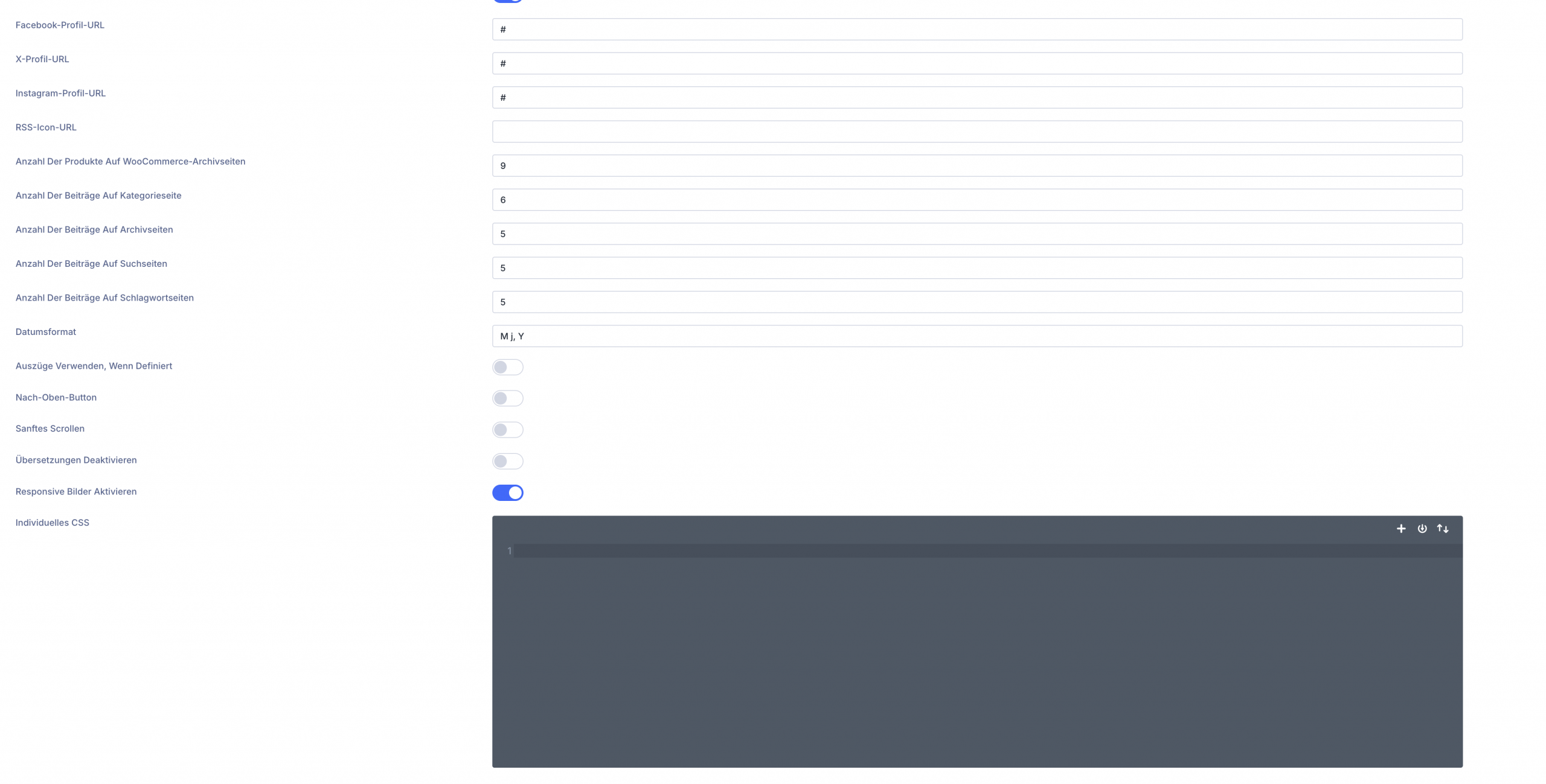
Divi Theme Optionen
Hier den CSS-Code ohne style-Tag einfügen.
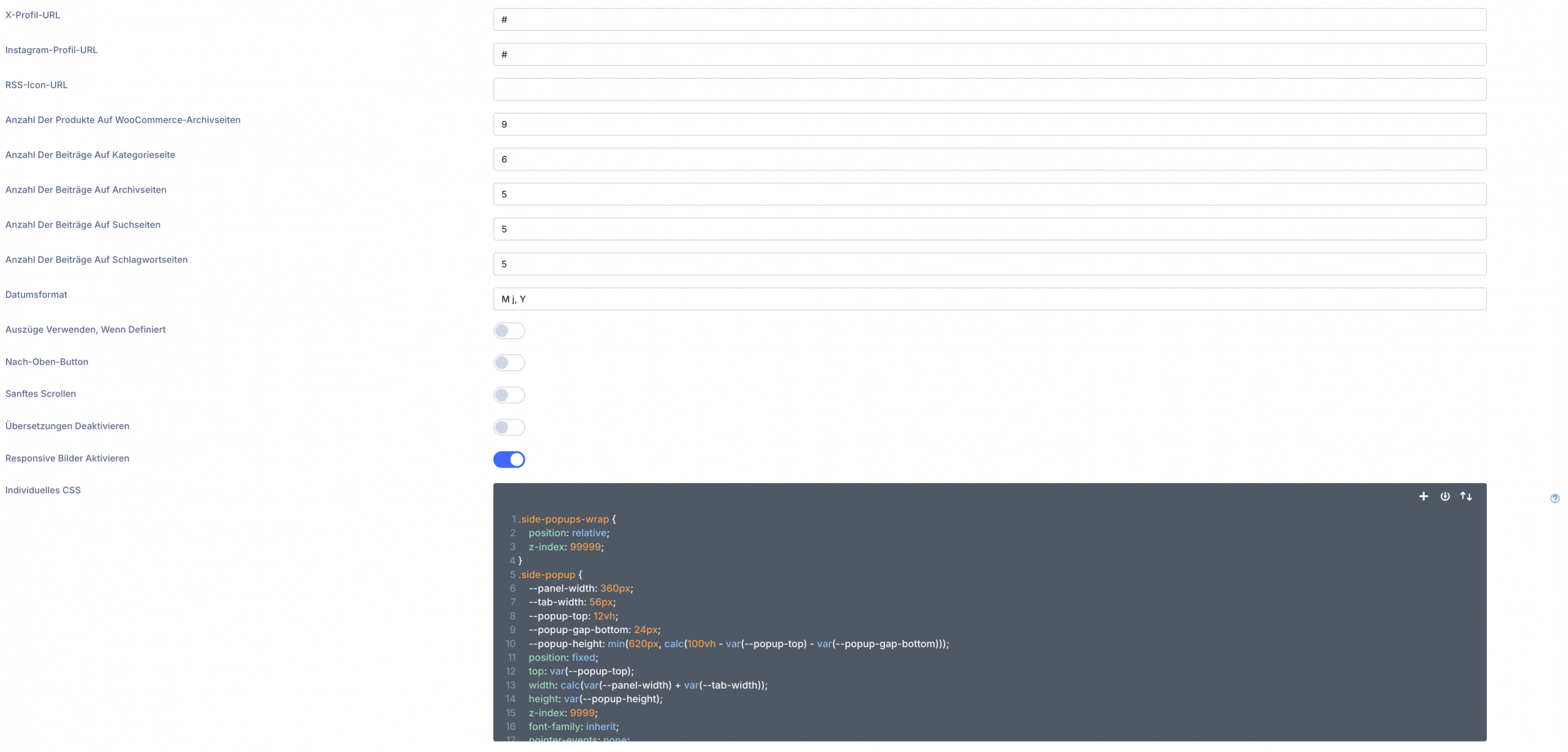
Divi Theme Optionen
Sieht dann so aus
CSS-Code für DIVI Theme Optionen
.side-popups-wrap {
    position: relative;
    z-index: 99999;
}
.side-popup {
    --panel-width: 360px;
    --tab-width: 56px;
    --popup-top: 12vh;
    --popup-gap-bottom: 24px;
    --popup-height: min(620px, calc(100vh - var(--popup-top) - var(--popup-gap-bottom)));
    position: fixed;
    top: var(--popup-top);
    width: calc(var(--panel-width) + var(--tab-width));
    height: var(--popup-height);
    z-index: 9999;
    font-family: inherit;
    pointer-events: none;
}
.side-popup.open {
    z-index: 10020;
}
.popup-pos-1 {
    --popup-top: 15vh;
}
.popup-pos-2 {
    --popup-top: calc(15vh + 134px);
}
.popup-pos-3 {
    --popup-top: calc(15vh + 268px);
}
.popup-pos-4 {
    --popup-top: calc(15vh + 402px);
}
.popup-pos-5 {
    --popup-top: calc(15vh + 536px);
}
/* RECHTS */
.side-popup.side-right {
    right: calc(-1 * var(--panel-width));
    transition: right 0.35s ease;
}
.side-popup.side-right.open {
    right: 0;
}
.side-popup.side-right .side-popup-tab {
    position: absolute;
    left: 0;
    top: 12px;
    width: var(--tab-width);
    height: 132px;
    border: 0;
    background: #007fc5;
    color: #fff;
    cursor: pointer;
    border-radius: 14px 0 0 14px;
    box-shadow: 0 8px 24px rgba(0, 0, 0, 0.18);
    font-size: 15px;
    font-weight: 700;
    letter-spacing: 0.3px;
    writing-mode: vertical-rl;
    text-orientation: mixed;
    display: flex;
    align-items: center;
    justify-content: center;
    padding: 14px 8px;
    user-select: none;
    pointer-events: auto;
    transition: background 0.25s ease;
    z-index: 4;
}
.side-popup.side-right .side-popup-panel {
    position: absolute;
    top: 0;
    left: var(--tab-width);
    width: var(--panel-width);
    height: 100%;
    display: flex;
    flex-direction: column;
    background: #ffffff;
    border-radius: 16px 0 0 16px;
    border-left: 4px solid #007fc5;
    box-shadow: 0 12px 40px rgba(0, 0, 0, 0.18);
    overflow: hidden;
    pointer-events: auto;
}
.side-popup.side-right .side-popup-close {
    position: absolute;
    top: 10px;
    right: 10px;
    width: 34px;
    height: 34px;
    border: none;
    background: #f2f2f2;
    color: #333;
    border-radius: 50%;
    font-size: 24px;
    line-height: 1;
    cursor: pointer;
    z-index: 5;
    transition: background 0.25s ease;
}
/* LINKS */
.side-popup.side-left {
    left: calc(-1 * var(--panel-width));
    transition: left 0.35s ease;
}
.side-popup.side-left.open {
    left: 0;
}
.side-popup.side-left .side-popup-tab {
    position: absolute;
    right: 0;
    top: 12px;
    width: var(--tab-width);
    height: 132px;
    border: 0;
    background: #007fc5;
    color: #fff;
    cursor: pointer;
    border-radius: 0 14px 14px 0;
    box-shadow: 0 8px 24px rgba(0, 0, 0, 0.18);
    font-size: 15px;
    font-weight: 700;
    letter-spacing: 0.3px;
    writing-mode: vertical-rl;
    text-orientation: mixed;
    display: flex;
    align-items: center;
    justify-content: center;
    padding: 14px 8px;
    user-select: none;
    pointer-events: auto;
    transition: background 0.25s ease;
    z-index: 4;
}
.side-popup.side-left .side-popup-panel {
    position: absolute;
    top: 0;
    right: var(--tab-width);
    width: var(--panel-width);
    height: 100%;
    display: flex;
    flex-direction: column;
    background: #ffffff;
    border-radius: 0 16px 16px 0;
    border-right: 4px solid #007fc5;
    box-shadow: 0 12px 40px rgba(0, 0, 0, 0.18);
    overflow: hidden;
    pointer-events: auto;
}
.side-popup.side-left .side-popup-close {
    position: absolute;
    top: 10px;
    left: 10px;
    width: 34px;
    height: 34px;
    border: none;
    background: #f2f2f2;
    color: #333;
    border-radius: 50%;
    font-size: 24px;
    line-height: 1;
    cursor: pointer;
    z-index: 5;
    transition: background 0.25s ease;
}
.side-popup-tab:hover {
    background: #006da8;
}
.side-popup.open .side-popup-tab {
    background: #00679f;
}
.side-popup-scroll {
    flex: 1 1 auto;
    min-height: 0;
    overflow-y: auto;
    -webkit-overflow-scrolling: touch;
    padding: 28px 24px 24px;
    padding-top: 58px;
}
.side-popup-scroll::-webkit-scrollbar {
    width: 8px;
}
.side-popup-scroll::-webkit-scrollbar-thumb {
    background: rgba(0, 0, 0, 0.22);
    border-radius: 999px;
}
.side-popup-scroll::-webkit-scrollbar-track {
    background: transparent;
}
.side-popup-close:hover {
    background: #e3e3e3;
}
.side-popup-scroll h3 {
    margin: 0 0 12px;
    font-size: 24px;
    line-height: 1.2;
}
.side-popup-scroll p {
    margin: 0 0 14px;
    font-size: 16px;
    line-height: 1.6;
}
.side-popup-scroll ul {
    margin: 0 0 20px 18px;
    padding: 0;
}
.side-popup-scroll li {
    margin-bottom: 6px;
}
.side-popup-button {
    display: inline-block;
    background: #007fc5;
    color: #fff !important;
    padding: 12px 18px;
    border-radius: 8px;
    text-decoration: none;
    font-weight: 600;
    transition: background 0.25s ease, transform 0.25s ease;
}
.side-popup-button:hover {
    background: #00679f;
    transform: translateY(-2px);
}
@media (max-width: 980px) {
    .side-popup {
        --panel-width: 300px;
        --tab-width: 52px;
        --popup-gap-bottom: 18px;
    }
    .popup-pos-1 {
        --popup-top: 12vh;
    }
    .popup-pos-2 {
        --popup-top: calc(12vh + 124px);
    }
    .popup-pos-3 {
        --popup-top: calc(12vh + 248px);
    }
    .side-popup.side-right .side-popup-tab, .side-popup.side-left .side-popup-tab {
        height: 118px;
        font-size: 14px;
    }
    .side-popup-scroll {
        padding: 24px 20px 20px;
        padding-top: 54px;
    }
    .side-popup-scroll h3 {
        font-size: 22px;
    }
}
@media (max-width: 767px) {
    .side-popup {
        --panel-width: 260px;
        --tab-width: 48px;
        --popup-gap-bottom: 14px;
    }
    .popup-pos-1 {
        --popup-top: 10vh;
    }
    .popup-pos-2 {
        --popup-top: calc(10vh + 110px);
    }
    .popup-pos-3 {
        --popup-top: calc(10vh + 220px);
    }
    .side-popup.side-right .side-popup-tab {
        height: 108px;
        font-size: 13px;
        border-radius: 12px 0 0 12px;
    }
    .side-popup.side-left .side-popup-tab {
        height: 108px;
        font-size: 13px;
        border-radius: 0 12px 12px 0;
    }
    .side-popup.side-right .side-popup-panel {
        border-radius: 14px 0 0 14px;
    }
    .side-popup.side-left .side-popup-panel {
        border-radius: 0 14px 14px 0;
    }
    .side-popup-scroll {
        padding: 20px 16px 16px;
        padding-top: 50px;
    }
    .side-popup-scroll h3 {
        font-size: 20px;
    }
    .side-popup-scroll p, .side-popup-scroll li {
        font-size: 15px;
    }
}
CSS und Java-Script in DIVI Theme Optionen einbauen in den Bereich Integration
In die Divi Theme Optionen 2. das JS einfügen
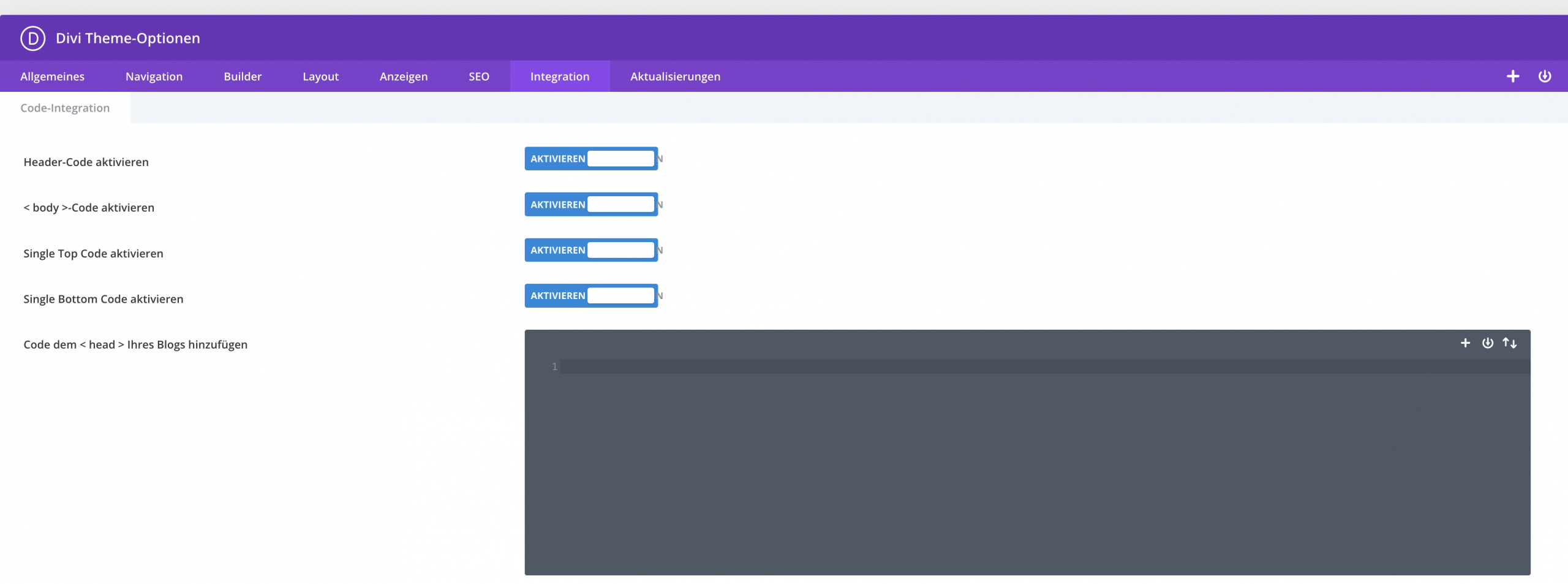
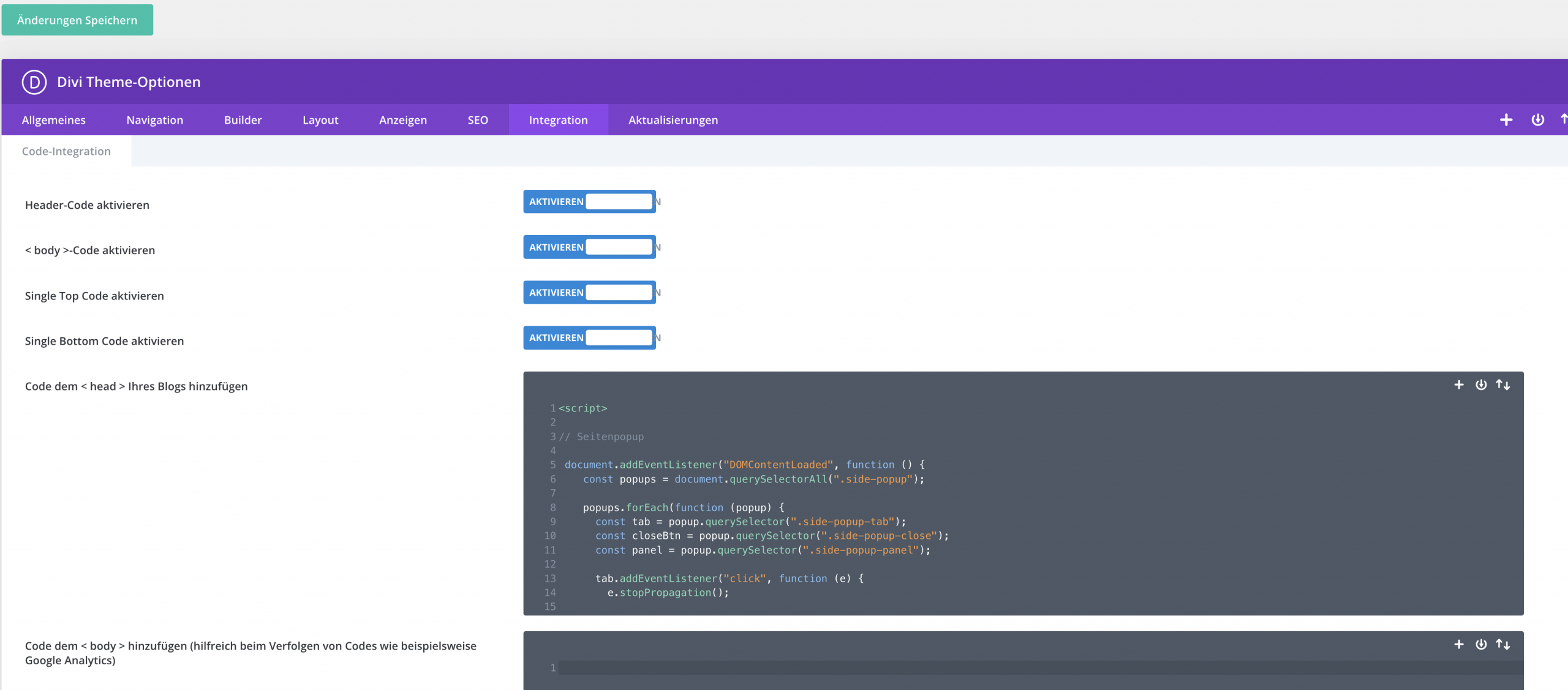
Java-Script für DIVI Theme Optionen bereich Integration
<script>
// Seitenpopup

 document.addEventListener("DOMContentLoaded", function () {
    const popups = document.querySelectorAll(".side-popup");

    popups.forEach(function (popup) {
      const tab = popup.querySelector(".side-popup-tab");
      const closeBtn = popup.querySelector(".side-popup-close");
      const panel = popup.querySelector(".side-popup-panel");

      tab.addEventListener("click", function (e) {
        e.stopPropagation();

        popups.forEach(function (otherPopup) {
          if (otherPopup !== popup) {
            otherPopup.classList.remove("open");
          }
        });

        popup.classList.toggle("open");
      });

      closeBtn.addEventListener("click", function (e) {
        e.stopPropagation();
        popup.classList.remove("open");
      });

      panel.addEventListener("click", function (e) {
        e.stopPropagation();
      });
    });

    document.addEventListener("click", function () {
      popups.forEach(function (popup) {
        popup.classList.remove("open");
      });
    });
  });

</script>
CSS und Java-Script auslagern
Beim Integrieren in dein Child-Theme beachten, dass alle erst oft nach dem Leeren des Browsercaches funktioniert.
Hier kommen die beiden Dateien für das Child-Theme. Download
Wenn Du die beiden Dateien entzipt und in das Child-Theme geladen hast, ist es notwendig, in der functions.php zwei weitere Zeilen hinzuzufügen, sonst funktioniert es nicht.Die functions.php muss ja wissen, dass sie auf diese Dateien zugreifen soll.
So ungefähr sollte dann die functions.php des Child-Themes aussehen
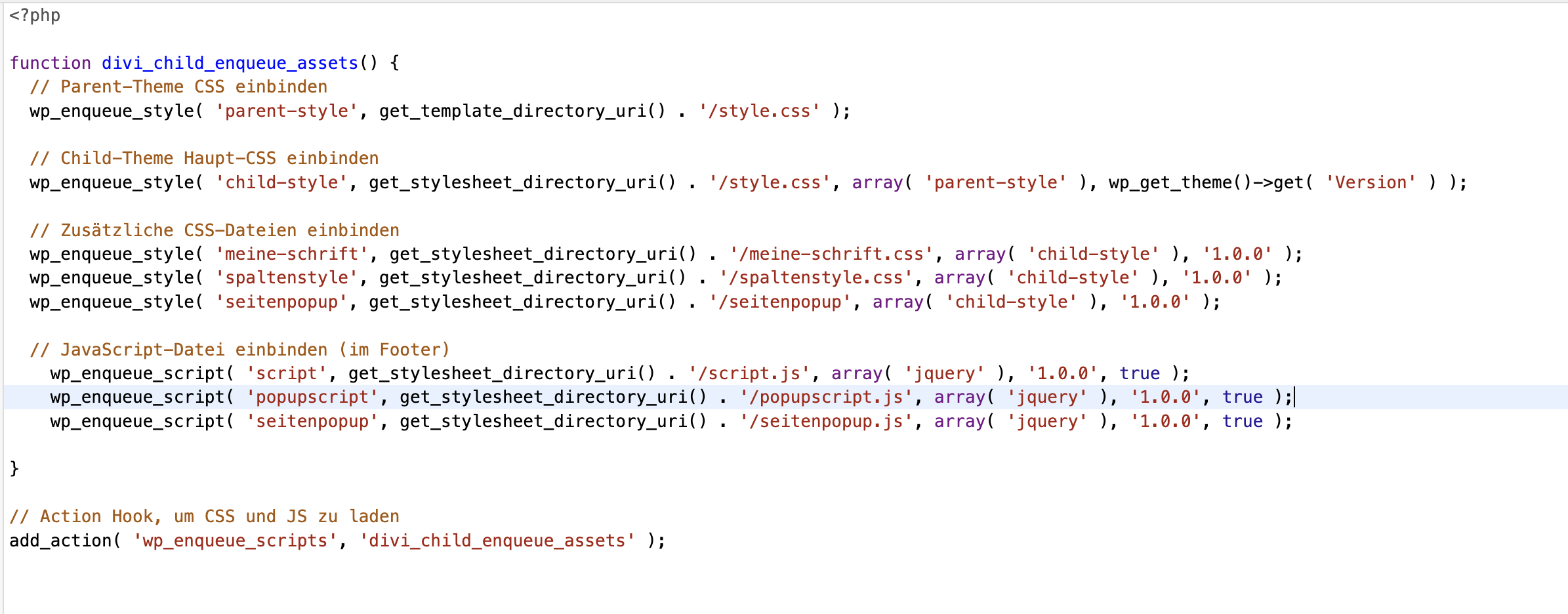
Erweiterung functions.php
// Zusätzliche CSS-Dateien einbinden
wp_enqueue_style( 'seitenpopup', get_stylesheet_directory_uri() . '/seitenpopup', array( 'child-style' ), '1.0.0' );

// JavaScript-Datei einbinden
wp_enqueue_script( 'seitenpopup', get_stylesheet_directory_uri() . '/seitenpopup.js', array( 'jquery' ), '1.0.0', true );
Kontakt
Dieses Popup sitzt links oben.
Der Tab ist am Inhalt fixiert und fährt mit heraus.
Lorem ipsum dolor sit amet, consectetur adipiscing elit.
Integer facilisis, sapien sit amet commodo faucibus, erat dui volutpat nunc.
Vitae scelerisque lorem lectus id magna.
Mehr erfahrenService
Dieses Popup sitzt links mittig.
Hier kannst Du längeren Inhalt einsetzen.
Duis aute irure dolor in reprehenderit in voluptate velit esse cillum dolore eu fugiat nulla pariatur.
Noch mehr Inhalt zum Testen des Scrollbereichs.
Mehr dazuInfos
Dieses Popup sitzt links unten.
- Individuelle Texte
- Buttons
- Formulare
- Downloads
Quis autem vel eum iure reprehenderit qui in ea voluptate velit esse quam nihil molestiae consequatur.
Details öffnenKontakt
Dieses Popup sitzt rechts oben.
Der Tab ist am Inhalt fixiert und fährt mit heraus.
Lorem ipsum dolor sit amet, consectetur adipiscing elit.
Integer facilisis, sapien sit amet commodo faucibus, erat dui volutpat nunc.
Vitae scelerisque lorem lectus id magna.
Mehr erfahrenAnfrage senden
Dieses Popup sitzt rechts mittig.
Auch hier kannst Du längeren Inhalt einsetzen.
Duis aute irure dolor in reprehenderit in voluptate velit esse cillum dolore eu fugiat nulla pariatur.
Excepteur sint occaecat cupidatat non proident.
Jetzt anfragenWeitere Infos
Dieses Popup sitzt rechts unten.
Die Tabs sind am jeweiligen Inhalt fixiert und fahren deshalb mit heraus.
- Individuelle Texte
- Buttons
- Formulare
- Downloads
- Shortcodes
Nam libero tempore, cum soluta nobis est eligendi optio cumque nihil impedit quo minus.
Details öffnen
